Evaluation Part 6
During completing my media product I have had to use various bits of hardware and software. Some of these included a learning process which I had to grasp throughout completing my coursework. These included -
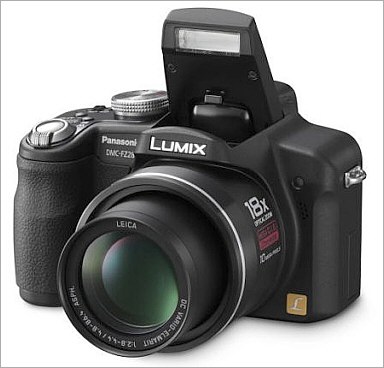
- Lumix Camera by Panasonic - This is the camera I filmed "I do?" with. I burrowed it from a friend but had no difficulty in using it at any point in time. It was a lot like my camera and allowed me to create the best quality picture achievable. As I arranged a practice run through of the shots we would film, it allowed me to get used to the camera as even with a good understanding of cameras, there are always minor differences.
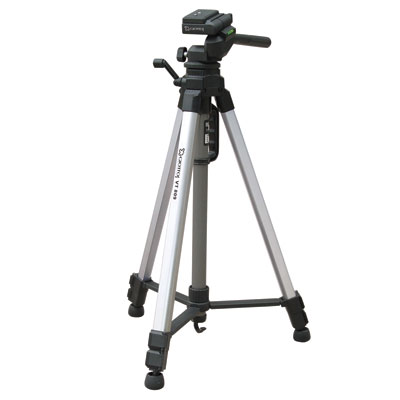
- Tripod - The tripod I used was a standard style. I was able to get used to how to adjust the angles and height of it during my first experience of filming at the start of the year and in my preliminary scene. One problem I had in the early stages was having problems with shots that panned horizontally as the tripod was stiff, therefore, the movement would be jumpy. It didn't take long to correct as it just needed to be adjusted on the tripod to allow a better movement but not too loose as such forces as the wind could move it or the picture could be panned quicker than desired.
- College Computers - I used the computers at college (Dell) in my Media lessons. I already have a good knowledge of computers, therefore it was simple to access. It allowed me to blog and upload footage onto which was essential. Also, all computers allowed me to edit my film on and 2 computers were just for Media students. These had a large hard drive space to save footage on and had the editing program installed on - Sony Vegas. I learnt that on the other computers, when I finished editing my film and went to render it, the computer would freeze and crash because it had insufficient space to carry out the process. This simply meant I had to render it on the allocated Media computers.
- My Personal Computer - I would use my personal computer a lot for mainly blogging at home. I also used it for research and creating ways of presenting my data. My computer had all the same programs plus more compared to the college ones (without Sony Vegas) and had a larger hard drive allowing a quicker working process and often a better internet connection.
- Blogger - www.blogger.com was the site I used to update my progress on my coursework. I found it simple and effective to use. One great bonus of the site is that you can link it and insert media from else where onto it such as own images, videos and presentations rather than just links to other websites. It also allowed me to change the themes and colours to make it more interesting and feel more personal to myself. It was also easy for my teachers to track my progress and guide me even when I wasn't in the class room.


- Prezi - I found that www.prezi.com was a brilliant way to present some of my posts rather than typing them out every time. This made them more attractive for both myself and any one viewing them. I personally found Prezi really easy to use and produced great results, creating a total of 8 presentations. To start with I was simply pasting links onto my blog posts which would take those who clicked to my prezi site. But I discovered that you could embed the presentation on to the post my copying the html code from the prezi into the "Edit html" tab when writing a post. This allowed the viewers to play the prezi without leaving my blog.
- Bubbl.us.com - This site allowed me to create mind maps which I could import onto my posts rather than making a long list. It was extremely simple to use. I had to create an account which took less than a minute and it saves up to 3 mind maps to edit at a later stage. I had no problems with this site at all.
- You Tube - I have been using You Tube previously before my Media coursework, so it was easy to find what I wanted and upload my footage. I used it to research into other film openings and link them to my posts. This was great because it allowed me to study and take ideas with out having to set up a dvd. I used the site to upload my footage, both the preliminary task and the final product, and then imported it onto my Blogger.

- Sony Vegas Movie Studio HD Platinum - I had never used an editing program before the start of the course but I have learnt the basics plus more of Sony Vegas and find it a brilliant program. I started by watching all the basic tutorials. These were extremely helpful as they were interactive, allowing you to do the actions as they tell you to. The program allowed me to put each separate shot together in the order they needed to be in. If a shot needed to be cropped it would allow me to do that so that each shot would flow into each other. If that's not what I wanted, there are many effects that could be used such as fading 2 shots together. Sony Vegas also allowed me to add my titles to the film, having full control over the font, size, style details and how long they appeared for. I found that when adding my sound track I did not want the whole song. For example, there is a long intro in the song, so the program allowed me to zoom in far enough to crop parts of the song to make it just 4 bars long before going into the verse. The danger of doing this could make the song sound disjointed, but the program allowed myself to cut at an exact moment, therefore to any viewer watching the film before reading this, would have no idea that there has been a part cut out. When I had finished editing my film, I was able to render my footage into a format suitable to play on computers and one that would be able to upload onto You Tube. It was also of a sensible memory and quality size. I had little problems using Sony Vegas. However, if I did find myself unable to do something, I would simply follow one of the tutorials. In one case, where I was learning how to add titles and how to use them to their full extent, I found the tutorial hard to understand. I simply typed it in on You Tube and found a great tutorial on there which allowed me to add the titles and complete my film.


- Memory Stick - I used my memory stick to transport all my footage, photos and documents from computer to computer. I found it had sufficient space and it never crashed or had any problems with it. It's potential capacity is 4GB.


No comments:
Post a Comment